v9.0 · 15-day free trial

Put your name on every picture Batch watermark software for Windows

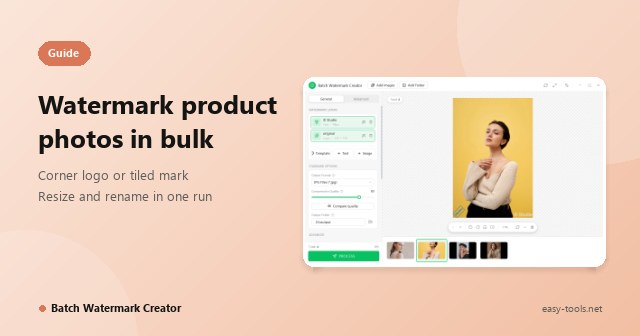
Once an image leaves your hard drive, your craft, your brand and your credit are out of your hands. Batch Watermark Creator is a Windows desktop app: give it a folder and it adds watermarks, resizes, converts and renames in one pass. The result matches the canvas exactly, and everything runs on your own PC.

Also on your phone: the free Android app, with no ads and no sign-up.

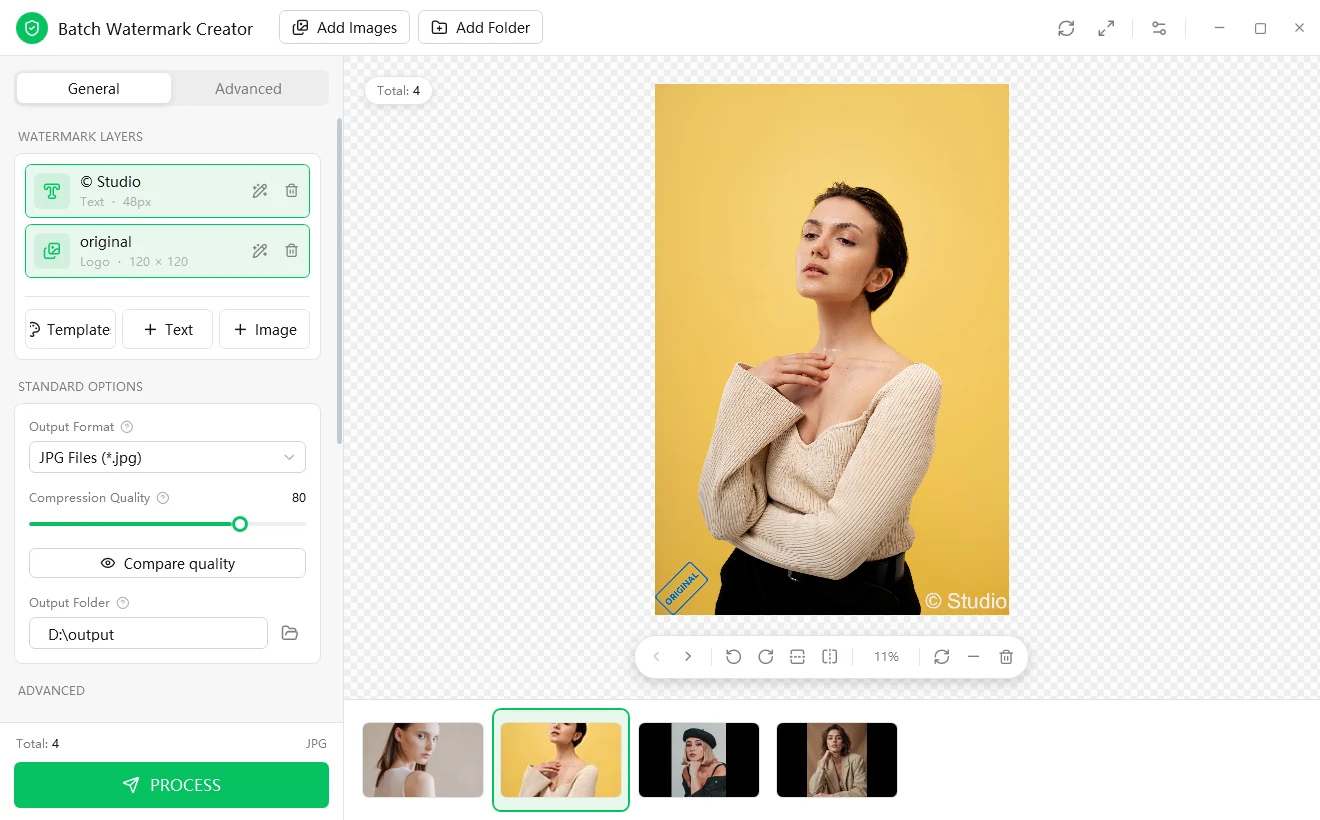
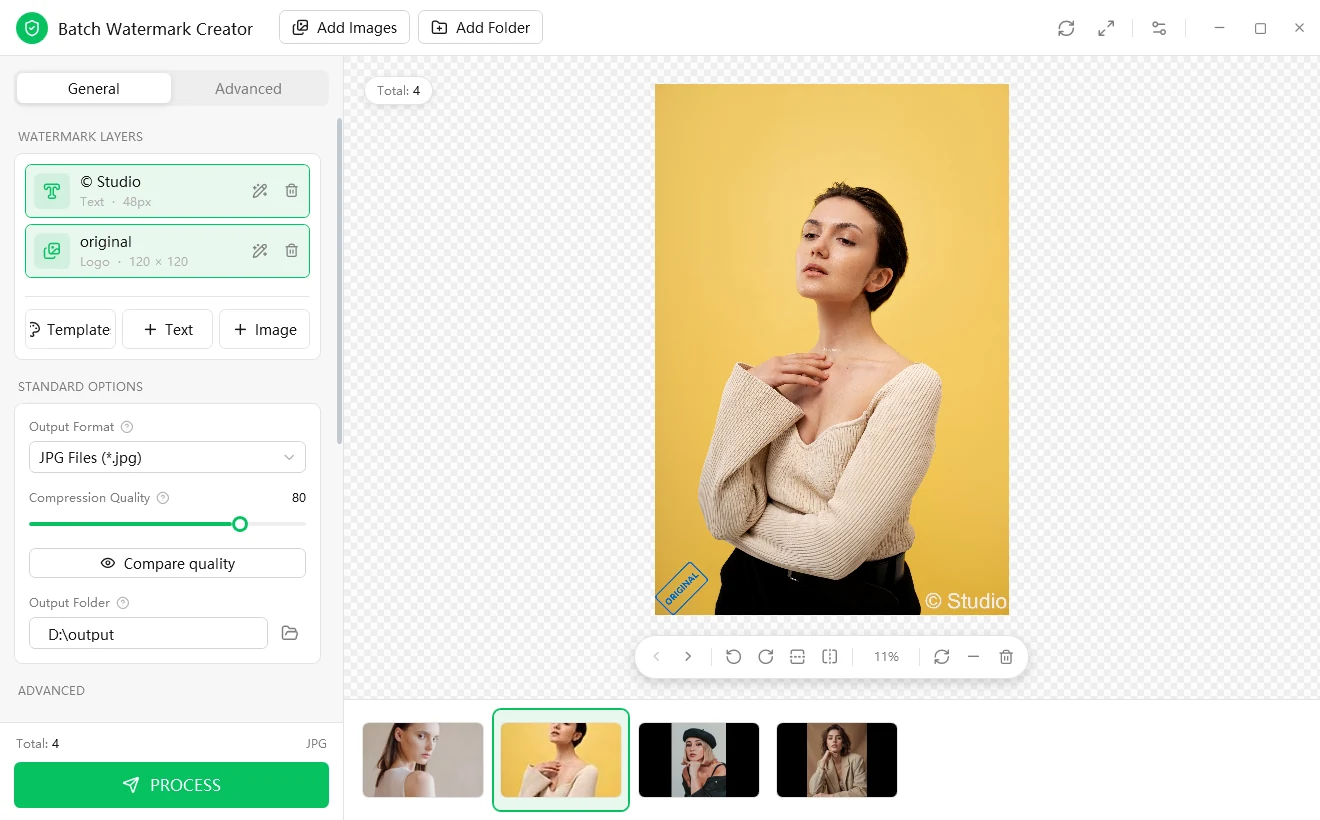
Batch Watermark Creator main window: watermark layers, standard options and a live preview canvas
Main window: watermark layers, output settings and the live preview canvas

7 formats

Output as JPG, PNG-24, PNG-8, WebP, BMP, GIF or TIFF

6 modes

Resize modes: Min, Pad, Box Pad, Crop, Max and Stretch

4 languages

Interface in English, Chinese, French and Spanish

Layers

Unlimited text and image watermarks, each configured on its own

The problem

Your images travel without you

A product shot, a portfolio frame, a diagram from a client proposal: each took real time and skill to produce, yet each can be copied in two clicks and re-uploaded in ten seconds.

1

Attribution disappears

Most platforms strip image metadata. Once a picture is re-shared, nothing in the file says who made it.

2

Your work promotes someone else

A competitor's listing, an unrelated blog, a scraped gallery: your image does the selling and nobody remembers you.

3

You cannot prove provenance later

When a dispute starts, a visible mark applied at the time of publication is far easier to point to than an argument about who had the file first.

The usual fixes each have a cost

Do nothing and hope

Images are reposted without credit, and your work promotes someone else's brand.

Mark images by hand in a photo editor

Hours of repetitive clicking, uneven results and a job nobody wants to own.

Upload to an online service

Unreleased work leaves your computer, and you rent access month after month.

A fourth option: Batch Watermark Creator

Give it a folder. It adds watermarks, resizes, converts and renames in one pass, entirely on your own PC.

A watermark is a deterrent, not a vault

No visible watermark makes copying impossible, and a determined person with enough time can remove nearly any mark. What a well-designed watermark changes is the economics:

  • It makes casual re-use visibly credited instead of anonymous.
  • It makes clean removal laborious enough that most people will not bother.
  • It keeps your name and brand attached to every copy that does circulate.

A good workflow therefore does two things: it makes the mark hard to remove cheaply, and it makes applying it cheap enough that you never skip it.

Meet Batch Watermark Creator

Every run follows the same fixed pipeline

It is built around one job, putting a consistent, well-designed mark on a whole set of pictures, and extends that job into the steps that normally force you to open a second tool. Configure it once on a live canvas, then run it on one image or ten thousand.

  1. 1

    Read the original

    Files, drag and drop, or a whole folder

  2. 2

    Resizeoptional

    By pixels or percent, 6 resize modes

  3. 3

    Apply watermark layers

    Text and/or image, as many as you like

  4. 4

    Encode

    7 output formats, quality you can preview

  5. 5

    Write and rename

    Numbering template with placeholders

  6. 6

    Restore timestampsoptional

    Keep the original creation and modified dates

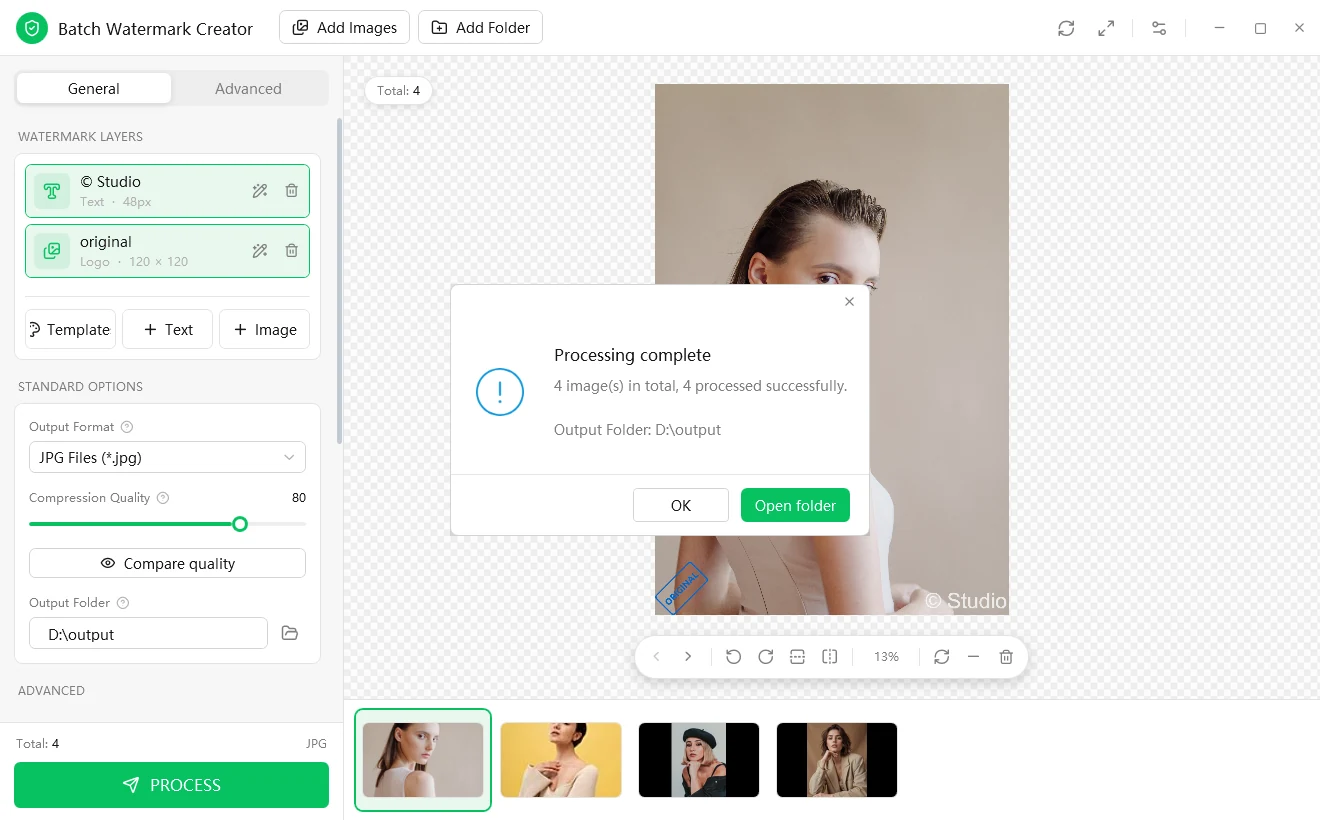
Processing complete message: 4 images processed successfully, with an Open folder button
When the run ends you see how many files succeeded and can open the output folder in one click

Five design principles

What a good batch watermark workflow needs

Looking at how photographers, sellers, agencies and in-house teams actually handle this, five requirements keep coming up. A tool that misses any one of them tends to get abandoned. Batch Watermark Creator is designed around exactly these five.

A text layer reading "© Studio" and an image layer with an ORIGINAL stamp, both applied to one photo
A text layer ("© Studio") and an image layer (ORIGINAL stamp) on the same photo, each with its own switch
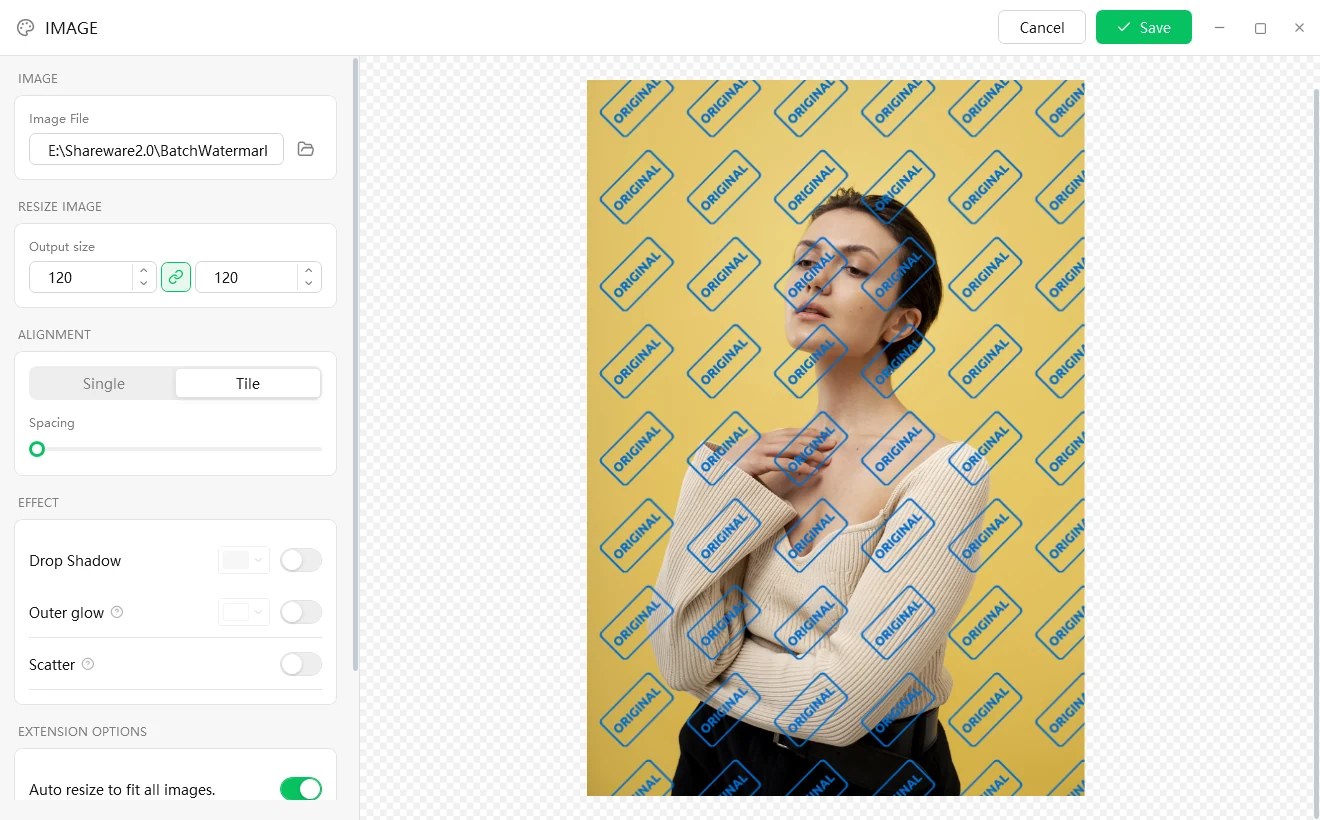
Image watermark editor with a transparent PNG logo tiled across the whole photo
A transparent PNG logo tiled across the frame, so there is no clean corner to crop to

Principle 1 · Protection

Make removal not worth the effort

A single small logo in one corner is the easiest thing in the world to crop away. Batch Watermark Creator gives you tools that make removal genuinely inconvenient:

  • Unlimited layers ·Stack as many text and image watermarks as you need in one pass, for example a quiet copyright line in the corner plus your logo tiled across the frame. Each layer switches on and off independently.
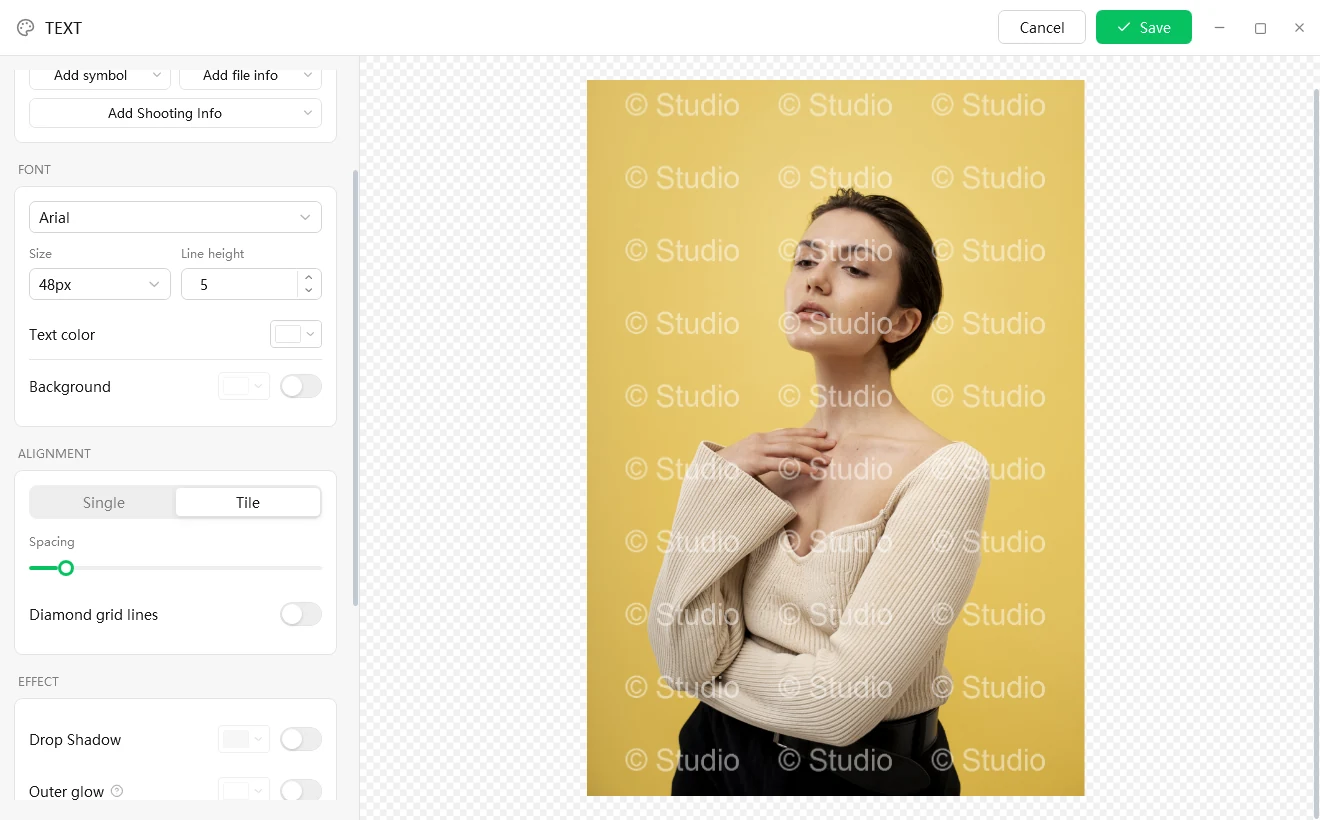
  • Tile mode ·Cover the whole image with a repeating mark, with adjustable spacing.
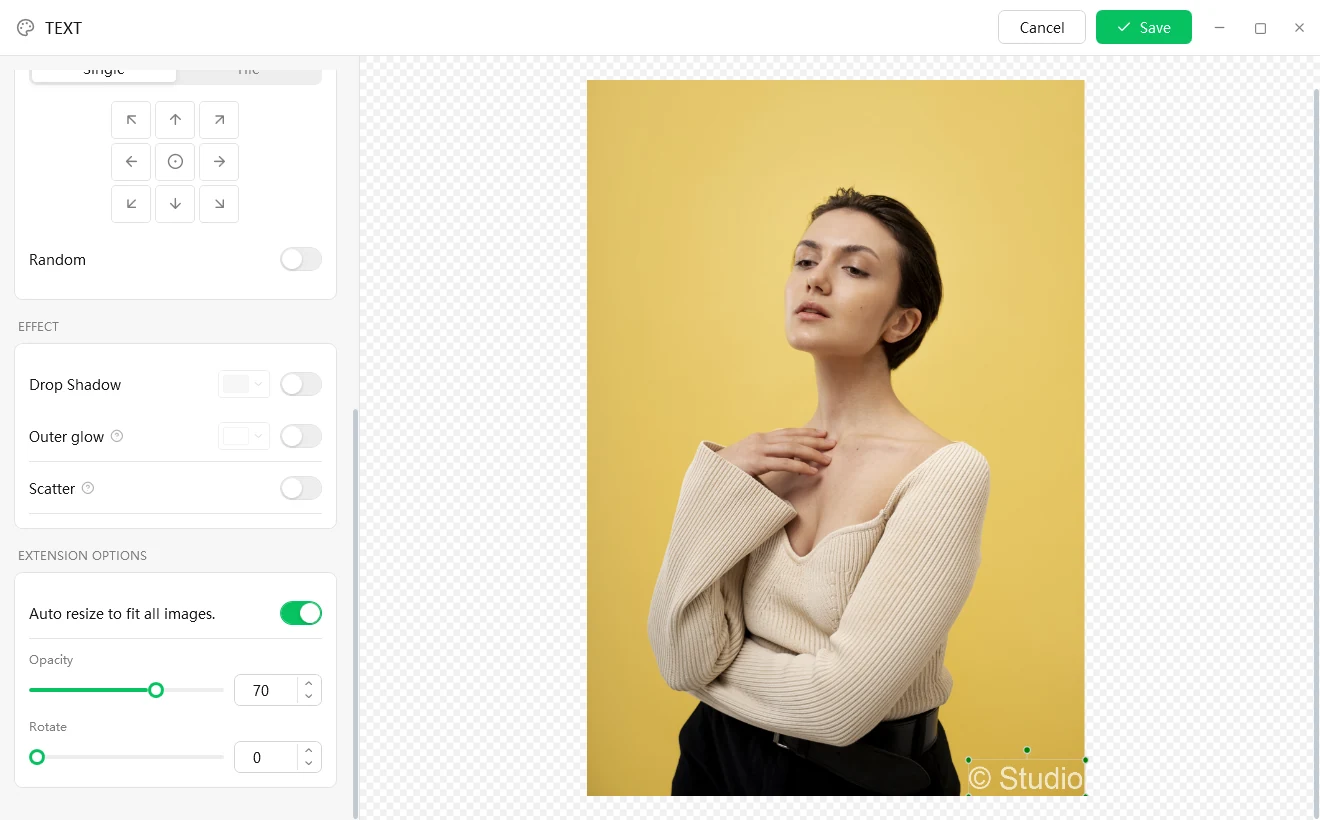
  • Random placement ·Put the mark in a different position on every image, which defeats batch croppers that assume a fixed spot.
  • Transparent PNG logos ·Use your real brand artwork. Transparency is preserved and the aspect ratio can be locked so it never distorts.
  • Auto resize to fit ·The mark scales to each image, so it keeps the same visual weight on a thumbnail and on a 40-megapixel original.

Looks professional, reads on any background

People are more likely to leave a mark in place when it looks good. Three stackable effects keep a plain line of text legible over any photograph:

Drop shadow A soft, directional shadow that lifts the mark off busy photos
Outer glow An even halo that keeps light text readable on dark images
Scatter A worn, spray-paint grain for a stylized, tamper-evident finish

Add nine-grid one-click alignment, free drag-anywhere positioning, adjustable opacity and 0-360° rotation, and you decide exactly how the mark sits in the picture.

Text watermark editor in Tile mode, with the text "© Studio" repeated across the whole photo
Tile mode for text watermarks, with adjustable spacing
Text watermark editor: nine-grid alignment, Random switch, and the Drop Shadow, Outer glow and Scatter effect switches
Nine-grid alignment, random placement, and the shadow, glow and scatter switches
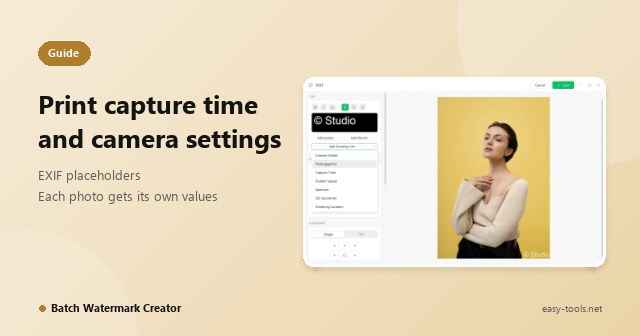
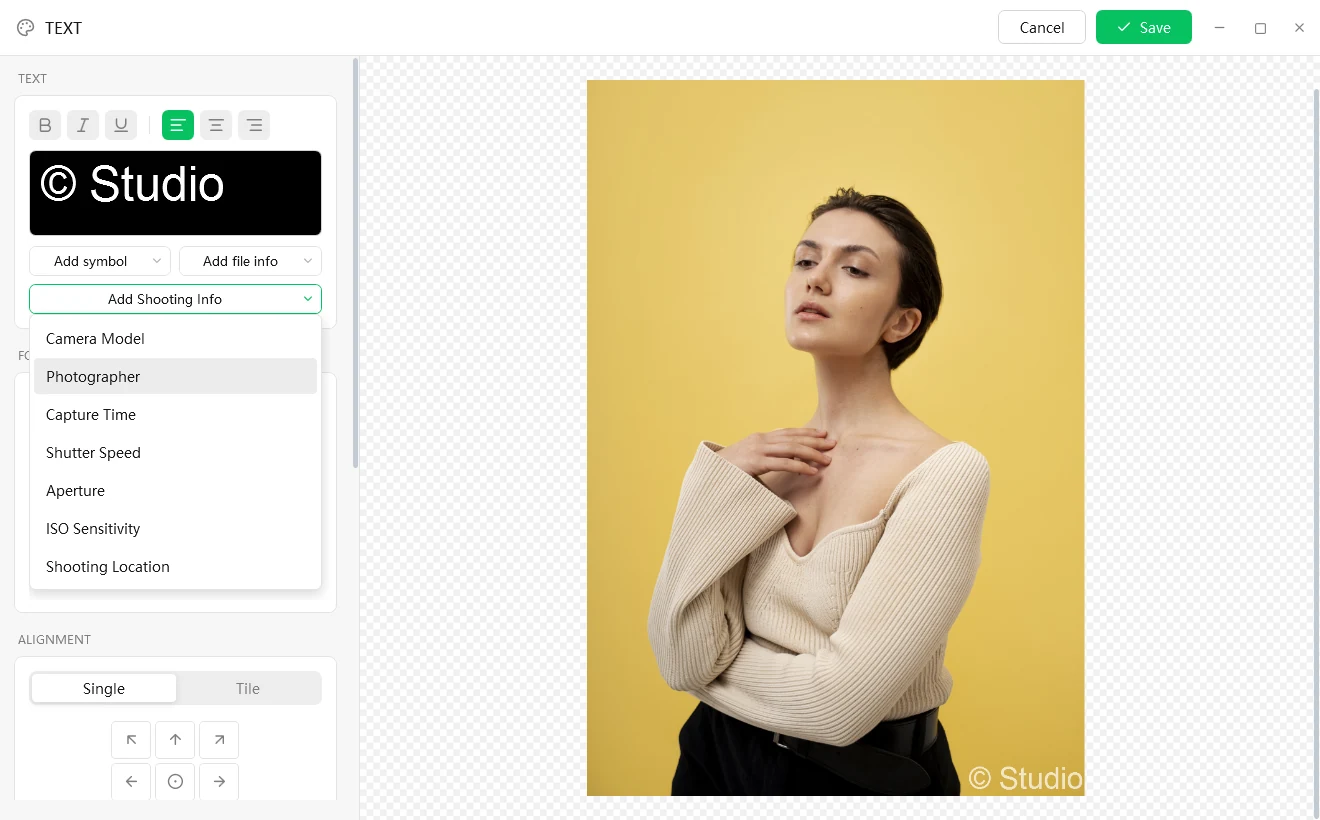
Text watermark editor with the Add Shooting Info menu open: Camera Model, Photographer, Capture Time, Shutter Speed, Aperture, ISO Sensitivity and Shooting Location
Insert shooting info into the watermark text; each image gets its own values

Principle 2 · Personalization

Batch, but not one-size-fits-all

Hand-marking is slow because every image needs something slightly different: its own file name, its own date, its own camera data. Insert dynamic placeholders into a text watermark and they are filled in per image as the batch runs, so one setup produces a correct caption on every file.

Symbols © ® ™
File information File name, extension, modified date, original date
Shooting info Camera model, photographer, capture time, shutter speed, aperture, ISO, shooting location

A photographer can stamp "© Your Name · camera model · date taken" across an entire shoot, and every frame shows its own correct values.

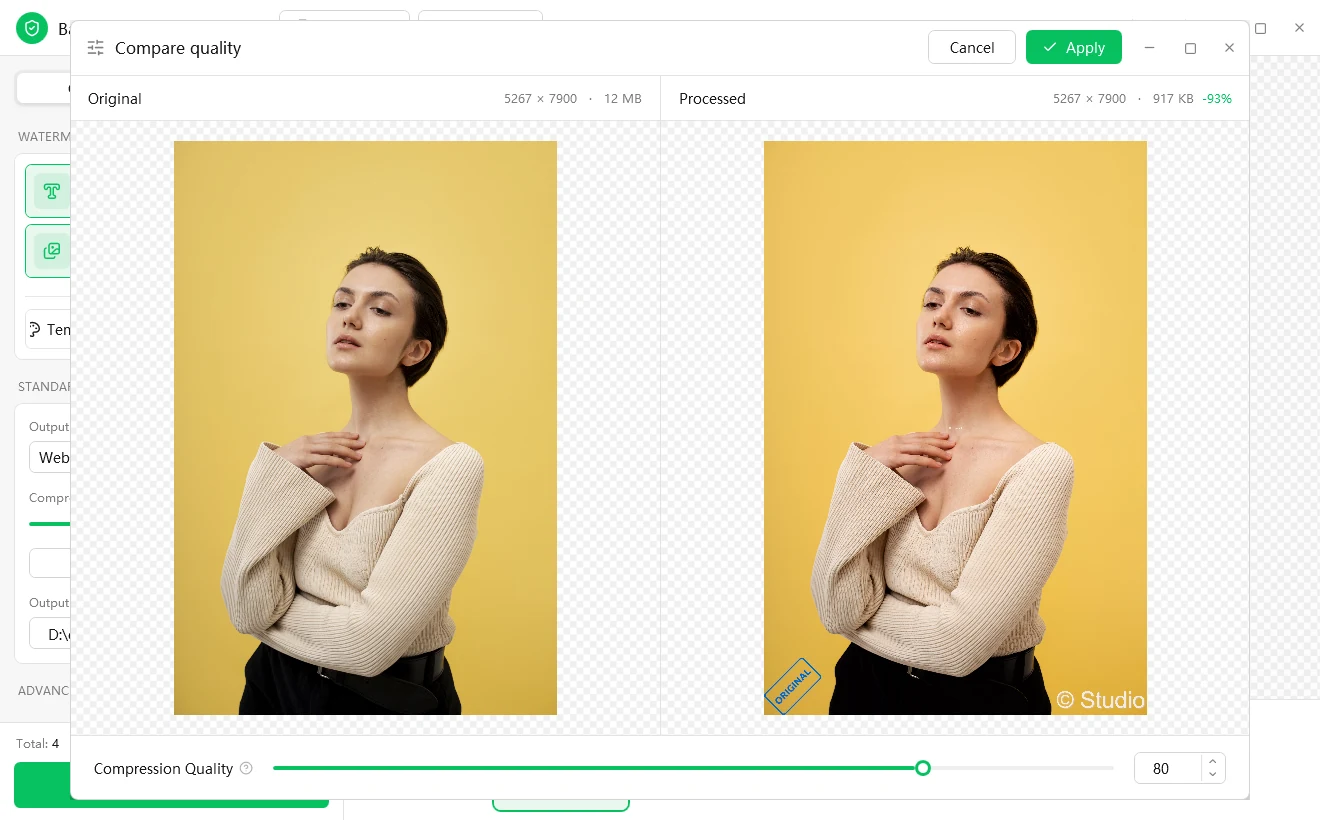
Compare quality window: the 12 MB original next to the processed WebP at 917 KB (-93%), with a quality slider below
Compare quality: the same photo goes from 12 MB to 917 KB (-93%) as WebP; drag the slider to re-encode live

Principle 3 · Predictability

What you see is what you get

Nothing erodes trust in a batch tool faster than a surprise at the end of a long run. Two features address that directly:

  • A live canvas that is the final result ·Drag, scale and rotate the watermark right on the image. The preview renders all enabled layers together and matches the output.
  • Compare quality ·Pick a photo and the tool runs it through the same pipeline as the batch, then shows the original and the result side by side. Each side is labeled with pixel dimensions and file size, with the percentage change.
  • Live re-encoding ·Drag the quality slider and the result is regenerated on the spot, so you can choose the right format and quality before you export.

Because the preview uses the real processing path rather than an illustration, the quality and size you see are what the exported file will have. It will even tell you the inconvenient truth, for example that re-saving a photo as PNG-24 makes it larger, not smaller.

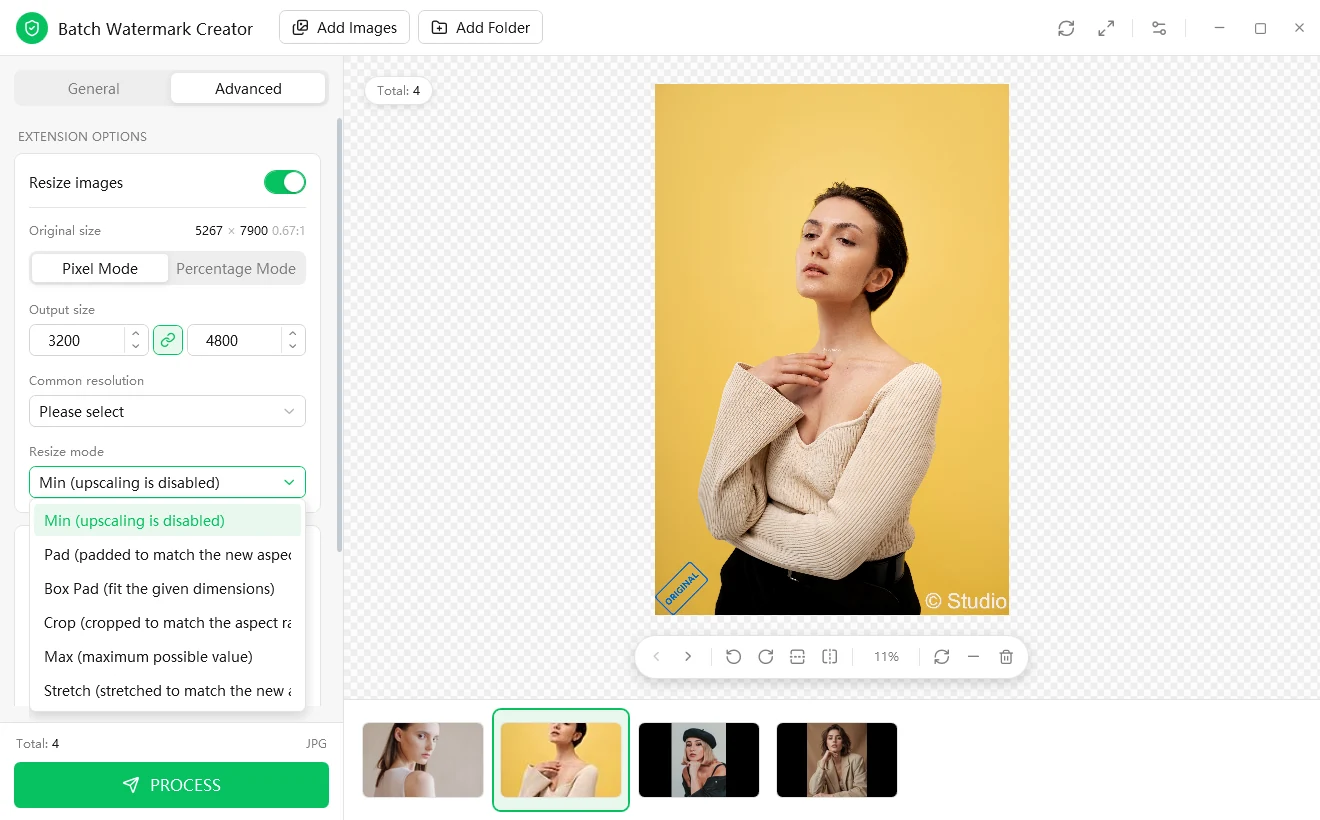
Advanced tab: Resize images in Pixel Mode and Percentage Mode, with the dropdown of six resize modes open
Advanced tab: resize by pixels or percent, with six resize modes

Principle 4 · Completeness

One pass, not four tools

Watermarking is rarely the only thing that has to happen before images go out. The Advanced tab handles the rest in the same run:

  • Resize ·By exact pixels, by percentage, or from presets (avatar, thumbnail, web or email, common monitor sizes), using any of six resize modes from "fit inside, no cropping" to "crop to fill".
  • Convert ·Save as any of seven formats whatever the source: JPG, PNG-24, PNG-8, WebP, BMP, GIF or TIFF.
  • Rename ·Numbering templates with placeholders, previewed live before you run.
  • Preserve and clean up ·Keep the original creation and modified dates, optionally strip EXIF metadata for privacy, and choose between overwriting and numbering duplicates.
  • Built for real folders ·It scans every subfolder and recreates the folder structure in the output. If one file in a thousand is corrupt, the batch keeps going and reports what succeeded and what failed.
  • Reusable settings ·Every run is saved in Recent with its complete settings. One click applies them to a new folder.
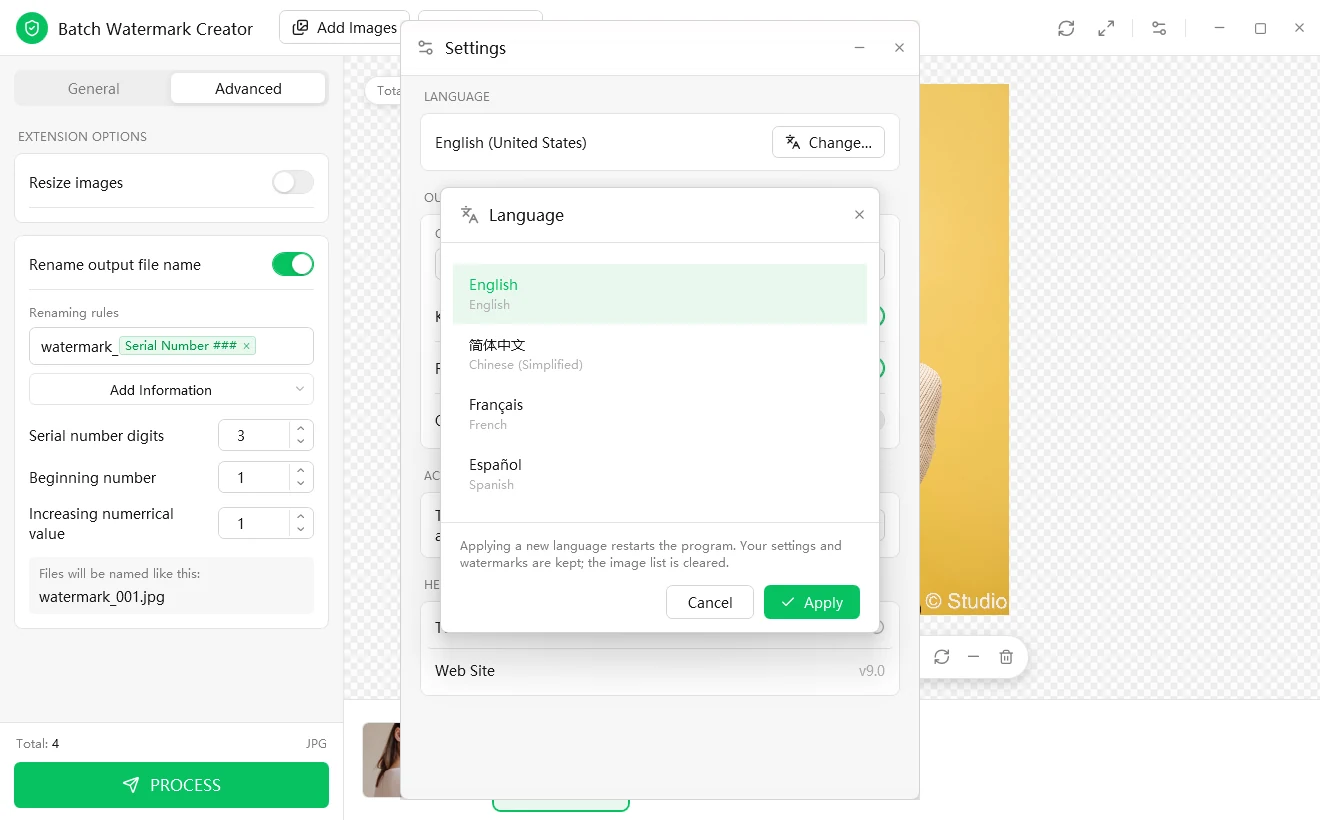
Language window listing English, Simplified Chinese, French and Spanish
Four interface languages, switchable from inside the app

Principle 5 · Control

Your files, your machine, your terms

  • Local processing ·Images are processed on your own PC. Unreleased work, client proofs and product launches do not need to be uploaded anywhere to be marked.
  • Originals are safe by default ·Results go to the output folder you choose. Pick a different folder and the source files are never touched. With overwrite off, same-name files are numbered instead of replaced.
  • No subscription ·A simple license, not a monthly bill that grows with your image count.
  • Four interface languages ·English, Chinese, French and Spanish.

A note on connectivity: the internet is used only to activate your license. Image processing itself runs entirely offline.

Who it is for

One pipeline, very different jobs

These setups show how teams typically configure it. They are illustrations, not rules.

Photographers and creatives

The need
Protect portfolios and client galleries without slowing delivery.
The setup
A text layer with "©", your name, and the camera model and date pulled from each shot's EXIF; a small logo layer; WebP or JPG at a web-friendly quality. Run it on the exported gallery folder.
The payoff
Every image is signed, every caption is correct, and the hundredth shoot goes exactly like the first.

Online sellers and e-commerce teams

The need
Make product photos instantly recognizable as yours and fit them to marketplace specs.
The setup
A tiled or corner logo layer, resize to the marketplace's pixel size, convert to the required format, rename with a numbered scheme that matches your catalog.
The payoff
One configuration, saved in Recent, that you re-apply to every new batch of listings.

Designers and agencies

The need
Send proofs and comps that cannot be quietly lifted into a competitor's pitch.
The setup
A large, semi-transparent diagonal mark with a shadow or glow so it stays legible over any artwork; a "for review only" text layer; lower-resolution output.
The payoff
Clients can evaluate the work, but cannot use it until it is paid for.

Bloggers and social media creators

The need
Put your handle on every picture before it goes out and gets screenshotted.
The setup
Your handle in a corner with an outer glow; random placement for sets where a fixed corner would get cropped.
The payoff
Your name travels with the image, even when the link does not.

Businesses and teams

The need
Apply confidentiality or "DO NOT COPY" marks across document scans and internal image sets.
The setup
A repeating tiled text layer that covers each page; EXIF stripped from the outputs; consistent file naming for the archive.
The payoff
A documented, repeatable process instead of one person's habit.

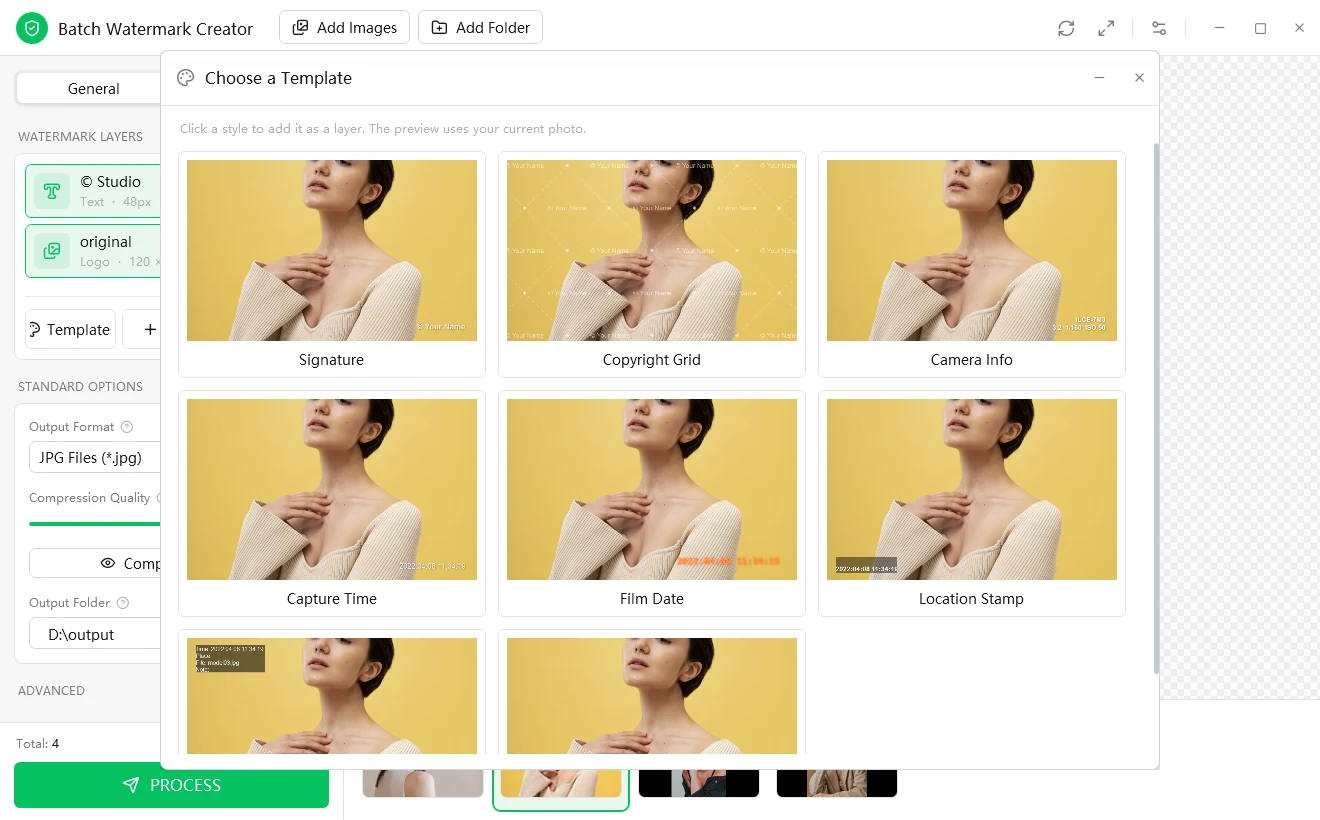
Ready-made templates are included too (Signature, Copyright Grid, Camera Info, Capture Time, Film Date, Location Stamp). Click one to add it as a layer.

What it saves

A worked example

The table is an illustrative model with stated assumptions, not a benchmark. Replace the numbers with your own.

Assumptions: 500 images per job; about 45 seconds of hands-on work per image to open, mark, export and rename it in a general-purpose editor; about 10 minutes to configure a batch the first time.

Measure Manual, in an image editor Batch Watermark Creator
Hands-on work per job 500 × 45 s ≈ 6 h 15 min About 10 min of setup, then unattended
Consistency across images Depends on attention and fatigue Identical settings on every file
Second and later jobs The same effort again Re-apply the saved settings in one click

Even if your manual estimate is half as long, the pattern holds: the cost of marking by hand grows with the number of images, while the cost of configuring a batch does not. The more you publish, the bigger the gap, and the more likely you are to keep doing it at all.

How it compares

An honest comparison, by category rather than brand

Capability Manual editing Cloud / online services Custom scripts Batch Watermark Creator
Hundreds of files in one run ✗ ✓ ✓ ✓
Visual drag-and-place positioning ✓ Varies ✗ ✓
Files stay on your computer ✓ ✗ ✓ ✓
Per-image EXIF and file-name captions Manual Varies Needs coding ✓ Built in
Resize, convert, rename in the same pass Separate steps Varies Needs coding ✓ Built in
Real size and quality preview before export Per file Varies ✗ ✓
No programming or ongoing fees ✓ ✗ ✓ ✓

Swipe the table sideways to see all columns

Where it is not the right tool

If you need to retouch or edit the content of individual photographs, use a photo editor. Batch Watermark Creator applies one consistent treatment to many files.

Get started in five minutes

How to watermark a folder of photos

Five steps from a folder of originals to a batch of images with your name on them.

  1. 1

    Add images

    Pick files, drag and drop, or choose a folder. Every subfolder is scanned.

  2. 2

    Design the watermark

    Add a text layer, an image layer, or both. Drag it where you want it, use the nine-grid buttons to snap it into place, or start from a template.

  3. 3

    Choose the output

    Pick a format and quality (use Compare quality if you are unsure) and an output folder.

  4. 4

    (Optional) Resize and rename

    Switch to the Advanced tab to set output dimensions and a naming rule.

  5. 5

    Press Process

    Watch the progress bar finish, then open the output folder.

Choose a Template window: Signature, Copyright Grid, Camera Info, Capture Time, Film Date and Location Stamp
Do not want to start from scratch? Click Template, pick a style, and it is added as a layer

Step-by-step screenshots are in the user guide.

Android app

Batch watermark your phone photos too

Stamp date, place, signature, camera info and logos on a whole batch of phone photos with one-tap templates. Free, no ads. Free, no ads, no sign-up. There is no iOS version yet.

Buy a license

Try the full program first (15-day free trial), then choose a license. Your license key is e-mailed to you after checkout. Prices are in US dollars.

Most popular

Personal License

$ 59 .99

One payment, no expiry, all future updates included.

Private, non-commercial use at home. One license per computer.

  • Every feature, no watermark
  • Updates included
  • License key e-mailed after checkout
Buy Personal

Commercial License

$ 119 .99

One payment, no expiry, all future updates included.

Use in a company or any other business. One license per computer.

  • Every feature, no watermark
  • Updates included
  • License key e-mailed after checkout
Buy Commercial

Education License

$ 29 .99

One payment, no expiry, all future updates included.

Students, teachers and schools. One license per computer.

  • Every feature, no watermark
  • Updates included
  • License key e-mailed after checkout
Buy Education
  • Secure checkout with PayPal
  • 30-day money-back guarantee
  • One license per computer

Several licenses, a school or a non-profit? Ask us for a quote. Already bought? See the activation guide or look up your license key. By buying you agree to the store's terms.

Download

The latest version of Batch Watermark Creator is v9.0 for Windows. Download it and try it free.

15-day free trial. After the trial, processing images needs an activated license.

Runs on Windows 7, 8, 10 and 11 (32-bit and 64-bit) · .NET Framework 4.5.2 · 64-bit and 32-bit installers

Need the 32-bit version? (3.6 MB) · All download options

At a glance

Platform
Windows 7, 8, 10 and 11 (32-bit and 64-bit). Requires .NET Framework 4.5.2. 32-bit and 64-bit installers.
Watermark layers
Unlimited text and image layers per pass
Output formats
JPG, PNG-24, PNG-8, WebP, BMP, GIF, TIFF
Resize modes
6 (Min, Pad, Box Pad, Crop, Max, Stretch)
Dynamic fields
File name, dates, shooting info (camera model, photographer, shutter speed, aperture, ISO, location)
Effects
Drop shadow, outer glow, scatter
Interface languages
English · Chinese · French · Spanish
Privacy
Images are processed on your PC; the internet is used only to activate
Licensing
Lifetime or 1-year license; 15-day free trial

Batch watermark FAQ

Answers about adding watermarks to many photos at once, what the trial includes, and how your files are handled.

How do I add a watermark to many photos at once?

Open Batch Watermark Creator, click Add Images to pick several photos or Add Folder to import a whole directory with its subfolders. Add a text or image watermark layer and drag it into place on the canvas, then choose an output format, a quality and an output folder, and press Process. The whole batch is watermarked in one run.

Is it free? What does it cost?

You can try it first: the download is the complete program (15-day free trial). Exports made during the trial carry a small "unregistered" mark, and after the trial, processing images needs an activated license. A license is a one-time purchase with no subscription: Lifetime licenses: Education $29.99, Personal $59.99, Commercial $119.99; 1-year licenses are also available. The Android app is free and has no ads.

Does the software upload my pictures?

No. Images are processed on your own PC. The internet connection is used only to activate your license.

Will it change my original files?

Not if you write the results to a different folder, which is the recommended setup. With "overwrite" turned off, files that share a name are numbered instead of replaced.

Can a watermark be removed?

In principle, any visible watermark can be removed by someone determined enough. Tiling, random placement, layering and effects such as shadow and outer glow make clean removal laborious, and that is usually enough to turn casual re-use into credited re-use. It is a deterrent, not a lock.

How do I make a logo watermark semi-transparent?

Add an image watermark and choose a PNG logo with a transparent background. In the layer settings, lower Opacity to somewhere between 30 and 50, and optionally switch on Drop Shadow or Outer glow so the logo stays readable on both dark and light photos.

Can I prepare images for an Etsy, eBay or Shopify listing?

Yes, the watermark, the size, the format and the file name can all be handled in one run. On the Advanced tab you can resize to exact pixels (or from common presets) with six resize modes, convert to JPG, PNG, WebP and more, and rename files with a numbered pattern that matches your catalog. Check each marketplace's own image rules for the sizes and formats it wants.

Besides watermarks, can it resize and rename images?

Yes. "Resize images" on the Advanced tab works in pixel mode (with presets such as avatar, web or email, and common monitor sizes) or percentage mode, with six resize modes. "Rename output file name" supports serial numbers, the original file name and dates. Both can run in the same pass as the watermark.

Can it process a folder that has subfolders?

Yes. It scans every subfolder and recreates the original folder structure in the output folder.

What happens if one file is corrupt?

That file is skipped and counted as a failure while the rest of the batch keeps going. The result message tells you how many files succeeded and how many failed.

Can I reuse my settings?

Yes. Every run is saved in Recent together with its complete settings, and one click applies them to a new set of files.

Which formats and Windows versions are supported?

Output formats are JPG, PNG-24, PNG-8, WebP, BMP, GIF and TIFF. The desktop edition comes as a 64-bit and a 32-bit installer and runs on Windows 7, 8, 10 and 11 (32-bit and 64-bit) (.NET Framework 4.5.2). A free, ad-free Android app is available separately.

Which languages does the interface support?

English, Chinese, French and Spanish. You can switch from within the app; changing the language restarts the program and keeps your settings and watermarks, but clears the list of added images.

For step-by-step instructions with screenshots, read the Batch Watermark Creator user guide.

Questions about Batch Watermark Creator?

If something is not working, or you would like to suggest a change, write to us at service@iotcrazy.com or use the contact form.