
Skip to content
FAQs

Frequently asked questions

Downloading, buying, activating and updating our programs. Every answer is on this page - jump to a topic or just scroll.

Download

3 questions

Getting hold of the installer, and what to do when a download or install goes wrong.

Q I cannot download the program.

A

Downloads occasionally fail because of a firewall, a proxy or an over-cautious antivirus program. Try again from the download page first — the installers are served from a global content network, so a second attempt usually works.

If it still fails, write to our support team and tell us which program you need. We will e-mail you the installer directly.
Q Do I need administrator privileges?

A

No. You can install and evaluate the program under a standard Windows user account.

Q I have purchased the program. Do I need to download it again?

A

Only if your copy is out of date. Open the program’s About box and compare the version with the one shown on our download page.

If they match, there is nothing to download — simply enter your license key. If yours is older, install the current release first; your license key works with it.

Purchase

8 questions

License types, payment methods, discounts, refunds and missing license keys.

Q How do I pay for the program?

A

All orders are paid through PayPal. On the Purchase page, choose the program and the license type you need, press Buy now and you are taken to the secure PayPal checkout.

You can pay from your PayPal balance or with a major credit or debit card through PayPal. Once PayPal confirms the payment, your license key is e-mailed to you.

Q Do you offer discounts for government, education or non-profit organisations?

A

Yes. Government bodies, schools and universities, and non-profit organisations qualify for a discount, as do orders for several licenses at once.

Contact our support team with the name of the program and the number of licenses you need, and we will send you a quote.

Q I have purchased the program. What should I do next?

A

Activate your copy. Your license key (also called the serial number) arrives by e-mail and contains everything the program needs to know about your license.

Before activating, make sure you are running the latest version: compare the About box with the version on our download page. Then enter the key — the step-by-step activation guide shows exactly where.

Q Is there a license for the whole office?

A

Not as a single license. Our programs are licensed per computer, so for ten people on ten computers you would order ten licenses.

Volume discounts apply from a few licenses upwards — ask us for a quote.

Q Is one license enough for one computer?

A

Yes. One license covers one computer, whatever the number of Windows user accounts on it. If you want to run the program on a second computer, you need a second license.

Q What currency can I use to pay for the program?

A

All prices on this site are in US dollars. PayPal converts the amount to your own currency at checkout, so you can pay from a PayPal balance or card in any currency PayPal supports.

Q What is your refund policy?

A

The download is the complete program, so you can test every feature for as long as you need before you buy. For that reason we do not offer an unconditional money-back guarantee.

That said, every refund request is looked at individually. If something went wrong with your purchase, tell us what happened and we will do our best to put it right.

Q I have purchased the program but have not received my license key.

A

Check the confirmation e-mail. Once PayPal has confirmed your payment, the license key is sent to the e-mail address on your PayPal account.

Give it a little time. PayPal payments are normally confirmed within minutes, but a payment funded from a bank account or flagged for review can take up to 24 hours to clear.

Look in the spam folder. Spam filters are not perfect, and mailboxes that ask senders to confirm they are human block automated messages altogether.

Still nothing? Use the license key retrieval service with the e-mail address you ordered with, or contact support and quote your order number.

Activation

9 questions

Entering your key, activating a machine that is offline, and moving to a new computer.

Q How do I activate the program?

A

Your license key is e-mailed to you, usually within five minutes of the purchase. Open the program, choose Help → Registration, enter your name, e-mail address and the key, and press Submit.

The activation guide walks through it with screenshots.

Q My computer is not connected to the internet. How do I activate?

A

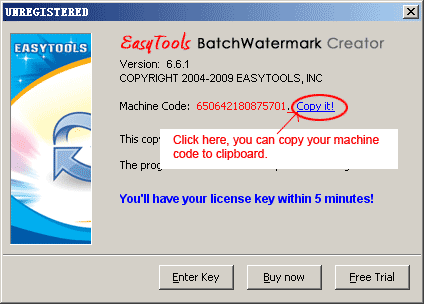
Use the offline method. Open the Unregistered dialog in the program and click Copy it to copy your machine code to the clipboard.

Then either follow the offline activation guide to generate the license data in a browser on any other computer, or send us the machine code (paste it with CTRL+V) and we will prepare the license data for you.

The Unregistered dialog with the machine code and the Copy it link

Q I purchased the program but cannot activate it.

A

If you have the license key but the program rejects it, the most common reason is that the payment has not reached our license database yet. Wait a little while and try again, and check that the key was copied completely, without spaces at either end.

If it still fails, contact support with your key and order number and we will sort it out, issuing a replacement key if needed.

Q Can I move the program to another PC?

A

Yes. On the new computer, install the program and enter your license key again. If you copied the installation folder across, delete the license.dat file inside it first, or simply reinstall.

To run the program on two or more computers at the same time, please purchase an additional license for each.

Q How do I change the registered e-mail address?

A

Activate the program again and enter the new e-mail address in the registration dialog. The new address replaces the old one on your license record.

Q I have a new computer. Do I need a new license?

A

No — your license moves with you. Install the program on the new machine and activate it with the same key. If you restored the installation from a backup, delete license.dat in the installation folder so the Unregistered dialog appears on startup.

If the key reports that no activations are left, do not worry: send a short message to our support team explaining the situation and we will reset it.

Q Is there a limit on the number of times I can install the program?

A

For evaluation, no: install it on as many computers as you like.

Once you have bought a license, activate the program on the number of computers your license covers and use it for the personal or business purpose that license allows. Copies you have not licensed should be uninstalled at the end of the evaluation.

Q Can I use the same license at home and in the office?

A

Each license covers one computer, so using the program at home and at work needs two licenses. Order as many licenses as you have installations.

Q Do I need to reactivate after reinstalling Windows?

A

Yes. Reinstalling the operating system removes the license data, so enter your license key again after you reinstall the program. Keep the e-mail with your key somewhere safe.

Update software

5 questions

How often we release, what an update costs and how to install one safely.

Q Do I need to update to the latest version?

A

We recommend it. Updates fix problems, add features and often make the program noticeably faster, and they are free for licensed users.

Q How often are updates released?

A

Major versions come out once or twice a year. Smaller maintenance updates are released as needed, typically every couple of months.

Q Is updating free of charge?

A

Yes. Every license includes lifetime upgrades: pay once, and every future release of that program is yours at no extra cost.

Q I have lost the details I used when purchasing the program.

A

We can look your license up, but we need enough to identify you reliably. A first name alone is not enough — there are many customers with the same name, and we cannot hand out someone else’s details.

Please send us as much as you remember: your full name, any e-mail addresses you may have used, the approximate purchase date and the program you bought.

If it is only the license key you have lost, the license key retrieval service can e-mail it to the address you ordered with.

Q How do I update the program?

A

Download the latest version from the download page, uninstall the old release and run the new installer. Your license and the settings you saved are kept.

Still stuck?

We answer most questions the same day

If you did not find the answer to your question, send it to our support service and we will get back to you by e-mail.

Contact support